Peppermint Glow Font for Colorful Craft Designs
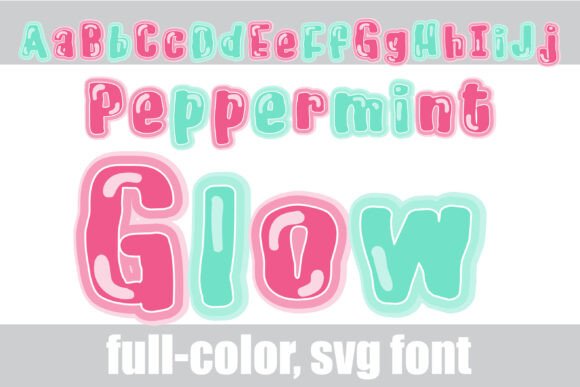
As a small business owner who spends hours perfecting product labels and digital downloads, finding the right typography can make or break a sale. Peppermint Glow is a standout choice among Color Fonts because it combines a soft sans serif structure with a glowing pink and mint green palette that instantly elevates handmade goods. Unlike standard Fonts that require complex layering in design software to achieve gradient effects, this typeface delivers vibrant, pre-colored lettering straight from your keyboard. For crafters creating everything from boutique stickers to wedding stationery, having a font that balances modern readability with whimsical charm is essential for maintaining a professional yet approachable brand identity.
Using Peppermint Glow for Wedding Stationery and Event Signage
When designing for the wedding market, Peppermint Glow offers a fresh alternative to traditional scripts while still retaining the romance necessary for bridal events. This full-color font features a soft sans serif with a glowing pink and mint green palette that works beautifully on welcome signs, seating charts, and menu cards where legibility is just as important as aesthetics. Because Color Fonts render differently across platforms, seeing how Peppermint Glow appears in your specific design software ensures your printed invitations match your digital proofs perfectly. The soft glow effect adds a tactile, neon-like quality to paper goods without requiring expensive foil stamping or specialty printing techniques, making it an incredible value-add for stationery designers working with standard home printers or print-on-demand services.
For event signage specifically, the clean lines of this sans serif ensure that guests can read names and directions from a distance, even with the decorative color treatment. You might use Peppermint Glow for the couple’s names or main headers while pairing it with a simple, thin-weight serif font for the body text to maintain visual hierarchy. This strategy keeps the design grounded and prevents the colorful display font from overwhelming the essential information. When creating digital templates for Etsy, remember that some older versions of design software may not support OpenType color layers, so always include a fallback monochrome version or clear instructions for buyers using legacy programs.
Creating Readable Product Labels with Peppermint Glow Color Fonts
Product packaging requires a delicate balance between eye-catching design and functional clarity, and Peppermint Glow excels when used strategically on candles, soaps, and cosmetic jars. As one of the most versatile Color Fonts for physical products, its mint and pink tones evoke feelings of freshness, sweetness, and self-care, which aligns perfectly with beauty and wellness niches. However, because the letters contain built-in gradients, you must test print sizes carefully; what looks crisp on a 24-inch monitor might bleed together on a 2-inch circular sticker. I recommend using Peppermint Glow strictly for short product names or flavor descriptors like "Sweet Mint" or "Rose Glow," keeping regulatory text and ingredients in a high-contrast, solid black sans serif to ensure compliance and readability.
- Candle Labels: Use the glowing effect to mimic the actual flicker of a candle flame or the scent profile visually.
- Bath Bombs and Soaps: The pastel palette suggests gentle ingredients and appeals to customers looking for luxury self-care items.
- Bakery Packaging: Perfect for cookie bags or cupcake boxes where the playful colors enhance the perception of homemade sweetness.
- Kids’ Products: The soft, rounded aesthetic is non-threatening and attractive for children’s apparel tags or toy packaging.
Accessing Peppermint Glow Alt Versions for Custom Color Palettes
One of the most valuable aspects of this typeface for commercial creators is the hidden versatility found within the file itself. There is an alt version you can access through your system's character map that contains additional colors, allowing you to adapt the font to different seasonal collections or brand rebrands without purchasing new assets. For example, if your shop transitions from spring pastels to autumn warmth, checking the alternate glyphs might reveal deeper teals or warmer corals that fit your fall lineup better than the default pink and mint. This feature transforms Peppermint Glow from a single-use novelty into a year-round workhorse for your design library, maximizing your return on investment as a font licensee.
Navigating the character map (Windows) or Glyphs panel (Mac/Adobe) is straightforward but often overlooked by newer designers. By scrolling through the available alternates, you can mix and match color variations within a single word to create custom ombré effects or highlight specific letters. This level of customization is particularly useful for personalized gifts where you want each customer’s name to feel unique. Just be sure to document which specific alternates you used in your source files so you can replicate the exact look for future reorders or matching set expansions.
Pairing Peppermint Glow with Serif and Script Fonts for Digital Downloads
Successful printable wall art and planner designs rely heavily on effective font pairing to guide the viewer’s eye and create emotional resonance. Peppermint Glow acts as a stunning focal point, but it needs supportive typography to function effectively in layouts like daily affirmations, motivational quotes, or calendar headers. Try pairing this glowing sans serif with a delicate, high-contrast serif font for body text; the sharpness of the serif contrasts beautifully with the soft blur of the glow, creating a sophisticated tension that feels modern and expensive. Alternatively, for greeting cards or party invites, combining Peppermint Glow with a flowing handwritten script can bridge the gap between digital precision and organic warmth, making your downloadable products feel more personal and less mass-produced.
When designing SVG-style cut files for Cricut or Silhouette users, remember that Color Fonts behave differently than vector paths. While Peppermint Glow is fantastic for direct-to-print projects like sublimation transfers or DTG printing, vinyl cutters cannot reproduce the internal gradient colors. If you plan to sell cut files, you will need to provide a flattened PNG version for print-and-cut applications or a simplified outline version for solid vinyl cutting. Being transparent about these technical limitations in your product listings builds trust with fellow makers and reduces customer support inquiries regarding compatibility.
Commercial Licensing and Best Practices for Selling with Peppermint Glow
Before listing any product featuring this typeface, verifying your commercial license terms is the most critical step in protecting your handmade business. Most premium Fonts allow for the creation of physical end products like mugs, shirts, and stationery, but restrictions often apply to selling editable templates where the end user could manipulate the font themselves. Since Peppermint Glow is a specialized Color Font, ensuring your customers have compatible software is also a licensing and usability consideration; you cannot assume every buyer has the latest version of Photoshop or Illustrator required to see the colored layers. Always include a PDF guide with your digital downloads explaining how to access the alt versions via the character map and troubleshooting tips for viewing the colors correctly.
Furthermore, consider how the font’s personality aligns with your long-term brand strategy. While the pink and mint palette is trendy and eye-catching now, ensure it complements your existing shop aesthetic rather than clashing with it. Using Peppermint Glow consistently across specific product lines—such as a dedicated "Glow Collection" of planners or stickers—helps build category recognition among your customers. This consistency turns a beautiful font into a recognizable brand asset, encouraging repeat purchases from buyers who associate that specific glowing typography with the quality and joy they experienced in their first purchase from your shop.